Sumio: Net Worth Tracker
- 3.8
- Rating
- 10.00K
- Installs
- Free
- Price

 Analysis by App-foxy
I approached Sumio: Net Worth Tracker as a practical finance app rather than a full banking replacement. Its purpose is to help me bring scattered financial information into one view: savings, investments, funds, stocks, property, and other assets. That sounds simple, but it solves a real problem. My net worth is rarely visible in one place when I rely only on a bank app or a brokerage account.
The app is free to download, with optional in-app purchases ranging from $2.99 to $29.99 per item. It is published by Fiduciary and sits in the finance category. The overall impression is focused and understandable: Sumio is built for people who want a personal overview of what they own and how that picture changes over time, not for someone looking for a complete tax, banking, or trading platform.
How Sumio feels in everyday use
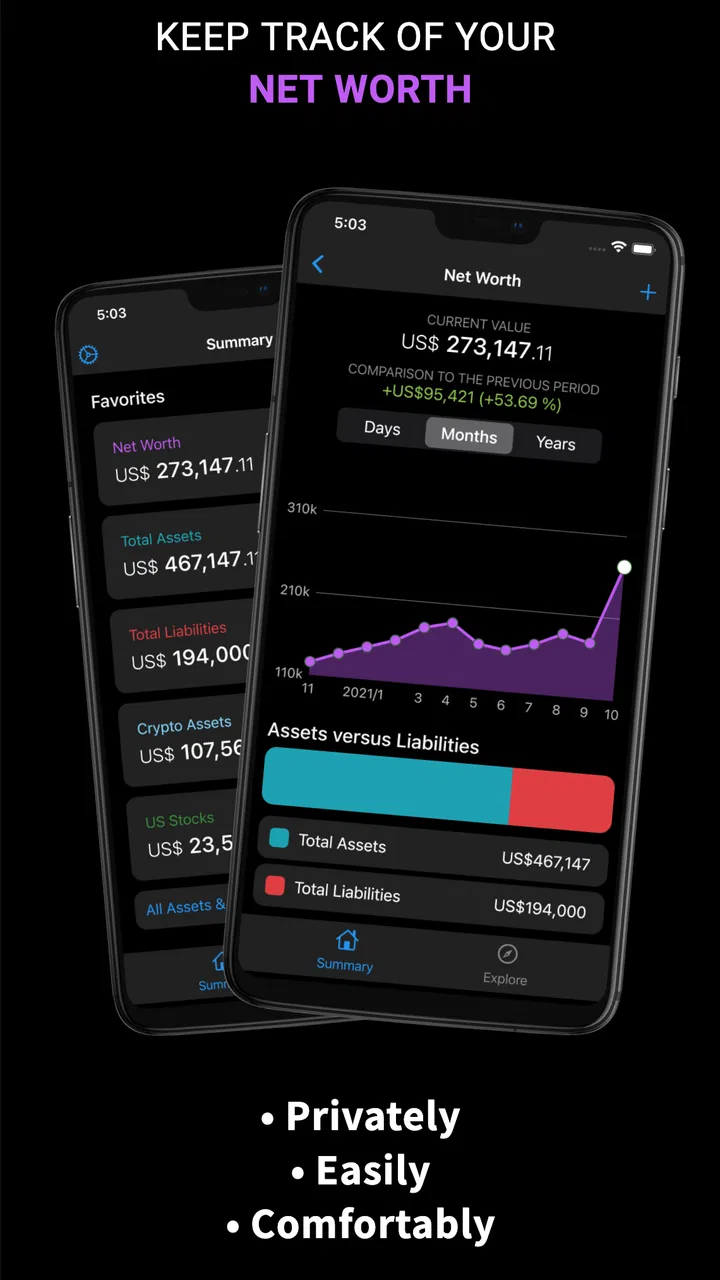
The first useful distinction is between tracking wealth and managing money. Sumio belongs mainly to the first group. I would use it after opening several accounts and realizing that my financial progress is difficult to judge from isolated balances. A current account shows cash, an investment platform shows securities, and perhaps a separate note contains the value of a vehicle or property. The app gives those pieces a common home.
You May Also Like

 Blood Strike: 2.5 Anniversary
Blood Strike’s Loadouts Turn Every Drop Into a Tactical Gamble
A close look at Blood Strike’s custom loadouts: how fast access to signature weapons reshapes its battle royale rhythm, rewards preparation, and narrows the gap between fights.

 Pandora - Music & Podcasts
Pandora’s Music Is Easy to Start, but Harder to Recover
Pandora’s strength is its low-effort path from a seed to a station. Its weak spot is how much confidence it asks you to place in connection, setup, and quiet recovery.

 8 Ball Pool
 Is Built on Rivalries, Rematches, and Routine
A close look at the rivalries, rematches, shared routines, and unanswered safety questions that turn a quick pool match into a persistent mobile community.

 Samsung Music
’s Quiet Strength Is Playing What You Already Own
Its reach comes less from spectacle than from dependable access to a personal library. That simplicity is both the app’s strongest retention engine and its ceiling.

 AccuWeather: Weather Radar
AccuWeather Review: A Quick, Clear Forecast for Everyday Decisions
For everyday plans, the best forecast is the one you can understand quickly. AccuWeather makes rain timing, radar, and local conditions easy to act on, with a few trade-offs.

 Hill Climb Racing
Why Hill Climb Racing Still Turns Crashes Into One More Run
A tiny car, a bumpy hill and one more upgrade: Hill Climb Racing keeps resurfacing because its simple chaos makes every near-miss feel personal.
More From Our News Desk
View All News


That makes it especially suitable for someone who wants a regular net-worth check without turning the process into a spreadsheet project. I can imagine entering a few asset categories, reviewing the total, and returning later to see whether the overall direction makes sense. The benefit is not just the final number. It is the habit of looking at financial progress as a whole instead of reacting to whichever account I opened most recently.
At the same time, I would not treat the total as automatically precise. A portfolio value can move daily, private assets may need manual updates, and debts or obligations only help the picture if they are recorded consistently. The app is most useful when I decide on a routine—for example, updating manually valued assets at the same point each month and checking investment balances on a similar schedule.
A realistic household workflow
Consider a person with money in a savings account, an index fund, a few individual stocks, and a car. Their bank app cannot show the investment portfolio, while the investment app cannot show the car. Sumio can serve as the overview layer. I would enter each asset separately, make sure the labels are clear, and then use the combined figure to answer a more useful question: am I building wealth overall, or merely moving money between accounts?
This also changes how I would judge a large purchase. Instead of seeing only the cash leaving the bank, I could consider the effect on the broader balance sheet. That does not make the decision automatically correct, but it provides better context. A purchase funded from savings may reduce liquid assets while leaving other holdings unchanged; an investment transfer may change the location of money without changing the total in the same way.
The important tip here is to separate assets by purpose rather than entering everything as one vague amount. Keeping cash, market investments, funds, and physical assets distinct makes the tracker more informative later. If every item is lumped together, the headline total may look tidy, but it becomes much harder to understand what is driving a change.
Where the portfolio view helps
For investment-minded users, the portfolio angle is more valuable than a simple savings tracker. Stocks and funds behave differently from cash, and their values can change for reasons that have nothing to do with monthly spending. A combined view helps me avoid confusing a temporary market movement with a change in saving discipline.
There is also a useful behavioral advantage. When I see investments alongside other assets, I am less likely to judge my finances from one account alone. A weak month in a brokerage account may look alarming in isolation, while the broader picture may be stable. Conversely, a growing cash balance can create a false sense of progress if debt or declining investments are ignored.
My advice would be to use the portfolio screen as a review tool, not as a reason to make impulsive trades. Sumio can help me notice allocation and direction, but it is not a substitute for research, a broker, or professional financial advice. The app’s strength is organization; the investment decision still belongs to the user.
What the current release tells me about the product
The current version is 1.9.18, and the app was released on December 7, 2021. Those details suggest a product that has had time to move beyond its initial launch, while the version number alone does not tell me exactly which individual functions changed in each update. I would therefore separate the practical experience of the current build from assumptions about its development history.
What I can say with confidence is that Sumio’s identity remains centered on net-worth calculation and tracking. It is not trying to become a general-purpose banking app in the way many financial platforms do. That focus is a positive when I want a clear overview, because fewer unrelated tools can make the main purpose easier to understand.
For an existing user, a newer version can matter even when the visible concept has not changed. Small improvements in editing entries, reviewing totals, or handling portfolio information can reduce friction over repeated use. However, I would not install an update expecting a completely different product. The central workflow still revolves around recording financial information and reviewing the combined result.
The minimum operating-system requirement is Android 7.0 or later. That makes the app accessible to people using older Android devices, although anyone with a very old phone should still pay attention to how comfortably the interface performs on their particular hardware. A finance tracker is something I may open briefly and often, so fast loading and easy editing matter more than flashy presentation.
How changes affect people already using it
If I were already using Sumio, I would judge each update by whether it makes routine maintenance easier. The most important test is not a new-looking screen; it is whether I can correct an outdated value without losing the structure of my portfolio. A tracker becomes frustrating when a small change requires rebuilding entries, so I would pay close attention to editing and historical continuity.
I would also keep a personal record of major manual updates. That is not because the app is unsuitable, but because net-worth tracking depends on the quality of the inputs. If I change the estimated value of a physical asset, add a new fund, or reorganize categories, a short note outside the app can help me remember why the total moved. This is a surprisingly useful habit when reviewing progress several months later.
New users should begin with a modest setup rather than trying to model every financial detail on the first day. I would add the major accounts and assets first, verify the total, and only then decide whether more categories are worth maintaining. This reduces the chance of abandoning the tracker because the initial setup feels like bookkeeping.
What it does better than common alternatives
The usual alternative is a spreadsheet. A spreadsheet offers flexibility, formulas, custom charts, and complete control, but that control comes with maintenance. I have to design the structure, protect formulas, decide how to value different assets, and remember to update everything. Sumio is more appealing when I want a ready-made personal finance view without building the framework myself.
A bank or brokerage app is more authoritative for the balance held with that institution. It will generally be the better place to confirm a transaction, inspect detailed holdings, or manage an account. Sumio’s advantage is breadth across different asset types and providers. It can act as the layer that connects information which would otherwise remain separated.
Dedicated budgeting apps are better for tracking income, bills, spending categories, and cash-flow habits. I would choose one of those if my main question were, “Where did my money go this month?” I would choose Sumio when the question is, “What do I own overall, and how is my financial position changing?” The two approaches can complement each other, but they are not interchangeable.
There is also a privacy and convenience trade-off in any manual tracker. Entering values myself may feel less seamless than linking accounts, but it can give me more control over what is included and how often it is updated. The cost is that the app’s usefulness depends on my consistency. If I want automatic, real-time account aggregation, I should look toward a different kind of finance service rather than expecting Sumio to behave like a bank dashboard.
Remaining gaps and practical limitations
The biggest limitation is the responsibility placed on the user. A net-worth figure is only as current as the latest entries. Cash may be easy to verify, but a property, vehicle, private holding, or other non-traded asset needs an estimate. That means the number should be treated as a personal planning indicator, not an official valuation.
Investors should be equally careful with market information. A portfolio total can be helpful for orientation, but it should not replace the detailed data available from the account where the investment is held. Before making a decision, I would confirm prices, quantities, fees, tax treatment, and transaction history through the relevant financial provider.
The free entry point is welcome, especially for someone testing whether net-worth tracking fits their routine. Still, optional purchases mean I would check which functions are included before building a long-term workflow around them. The listed purchase range runs from $2.99 to $29.99 per item, so the practical value depends on whether the paid tools solve a problem I actually have. I would not pay simply to make the app feel more complete.
Another limitation is that a single total can hide important differences. Two people may have the same net worth while one has mostly accessible cash and the other has money tied up in long-term or difficult-to-sell assets. I would therefore review the composition of the total, not just its direction. This is one of the most important ways to avoid drawing the wrong conclusion from a seemingly positive number.
I would also skip this app if my priority is active trading, detailed investment analysis, automated bill management, or comprehensive household budgeting. Those tasks require tools designed around transactions and financial operations rather than an overview of assets. Sumio makes more sense as a companion tracker than as the only finance app on a phone.
Three habits that make the tracker more useful
First, I would establish a valuation date. Updating everything randomly creates a noisy history because some assets reflect today while others reflect a much older estimate. A consistent monthly or quarterly check gives the total more meaning, even if the app itself does not force that schedule.
Second, I would distinguish between a market-driven change and a contribution-driven change. If the total rises because I deposited money, that tells me something different from a rise caused by investment performance. Recording the reason in my own notes makes the app’s figures easier to interpret and prevents me from mistaking luck or volatility for a repeatable financial habit.
Third, I would use the app to identify missing categories. If the total looks unexpectedly low, I would not immediately assume the market performed badly. I would check whether a retirement holding, savings goal, debt, or physical asset was left out. This simple audit is often more valuable than repeatedly refreshing a balance.
Who should use it and what to watch next
Sumio is a good fit for a person who wants a straightforward view of assets spread across several places. It is also useful for beginners who find spreadsheets intimidating but still want to start measuring progress. The Everyone content rating makes it broadly approachable, and the app has passed the early-adoption stage with over ten thousand installs and an average rating of 3.8 from around seventy-eight ratings.
Those figures suggest real interest, but I would still read the experience as personal rather than universal. A finance app can work perfectly for someone with a few manually maintained assets and feel inadequate to someone expecting automatic account synchronization or advanced analysis. The right question is not whether it replaces every financial tool; it is whether its focused overview matches my routine.
Before committing, I would watch how comfortably I can add, edit, and review different asset types in the current build. I would also pay attention to how clearly the app separates current values from older estimates and whether the paid options offer meaningful convenience. These are the details that determine whether I keep returning after the initial setup.
For existing users, future development is worth judging by maintenance quality. Better handling of historical changes, clearer portfolio organization, and less effort when updating manually would directly improve the product’s central purpose. I would value those improvements more than unrelated extras, because a net-worth tracker succeeds through reliable, low-friction repetition.
My final view is positive but measured. Sumio gives me a practical way to see assets together, and that perspective is genuinely different from what I get inside a single bank or brokerage app. Its main weakness is equally clear: I have to keep the information current and interpret the total intelligently. Use it as a personal financial dashboard, not as a bank, broker, or financial adviser. For that specific job, the free app is worth trying, especially if my money is scattered across savings, stocks, funds, and other assets. If I need automated transactions or deep investment tools, I would pair it with—or choose instead—a more specialized service.
FAQs for Sumio: Net Worth Tracker
01What is Sumio: Net Worth Tracker used for?
Sumio: Net Worth Tracker is a personal finance app designed to help you monitor your overall financial position in one place. You can record assets such as bank balances, investments, property, and vehicles, then subtract liabilities like loans or credit card debt. The app presents your information through summaries and visual progress tracking, making it easier to understand whether your net worth is improving over time.
02How does Sumio calculate my net worth?
The app calculates net worth by adding the value of your recorded assets and subtracting your outstanding liabilities. You can enter accounts and possessions manually, update their values periodically, and organize them into categories. The result is only as accurate as the information you provide, so Sumio should be treated as a tracking and planning tool rather than an official financial statement or replacement for professional financial advice.
03Can I connect my bank and investment accounts to Sumio?
Sumio may offer account connection or synchronization features depending on your country, platform, subscription, and the financial institutions supported at the time you use the app. In some cases, users can choose manual entry instead of linking accounts. Before downloading or subscribing, check the current store listing and in-app connection options, and review the privacy details carefully to understand how financial data and login credentials are handled.
04Is Sumio: Net Worth Tracker free to download?
Sumio can generally be downloaded without an upfront charge, but some features may require a paid plan, trial, or in-app purchase. Premium access can vary by region and may include expanded tracking, automation, reports, or additional customization. Review the pricing page before starting a trial, especially the renewal terms, billing frequency, and cancellation process, so you know exactly what will remain available on the free version.
05Is Sumio safe for tracking personal financial information?
Sumio is built for handling sensitive financial details, but no app can eliminate every privacy or security risk. Use a strong, unique password, enable available device security, and avoid entering information you are uncomfortable storing digitally. If you connect external accounts, read the app’s privacy policy and permissions before approving access. Also remember that manually entered balances and valuations should be checked regularly for accuracy.
Pros
- Clean dashboard makes net worth changes easy to understand.
- Supports multiple account types for a broader financial overview.
- Useful charts help visualize wealth growth over time.
- Manual entries allow tracking assets not linked to institutions.
- Can encourage regular saving and better financial awareness.
Cons
- Bank connections may not support every country or financial institution.
- Some features may require a paid subscription.
- Manual updates can become time-consuming with many accounts.
- Financial data depends on accurate entries and account valuations.
- Users may have privacy concerns when linking sensitive financial information.

Sumio: Net Worth Tracker
Gallery